How to translate an Astro site with i18next
Astro's i18n routing gives each language its address; plain i18next adds t(), plurals and fallbacks while the site is built, and sends no JavaScript to the browser. i18next-cli with its Astro plugin keeps every language complete.
Astro builds content sites: file-based routing, plain HTML by default, interactive "islands"
only where a page asks for them. Since Astro 4.0 it has i18n routing
built in: every language gets its own address (/en/, /de/), and helpers such as getRelativeLocaleUrl build the
links.
What the routing does not give you is a t(): no plurals, no interpolation, no fallback to the default language.
Astro's own i18n recipe keeps the strings of every language in one ui.ts
object and looks them up by hand, which stops where plurals and interpolation begin. Plain i18next fills that gap while Astro
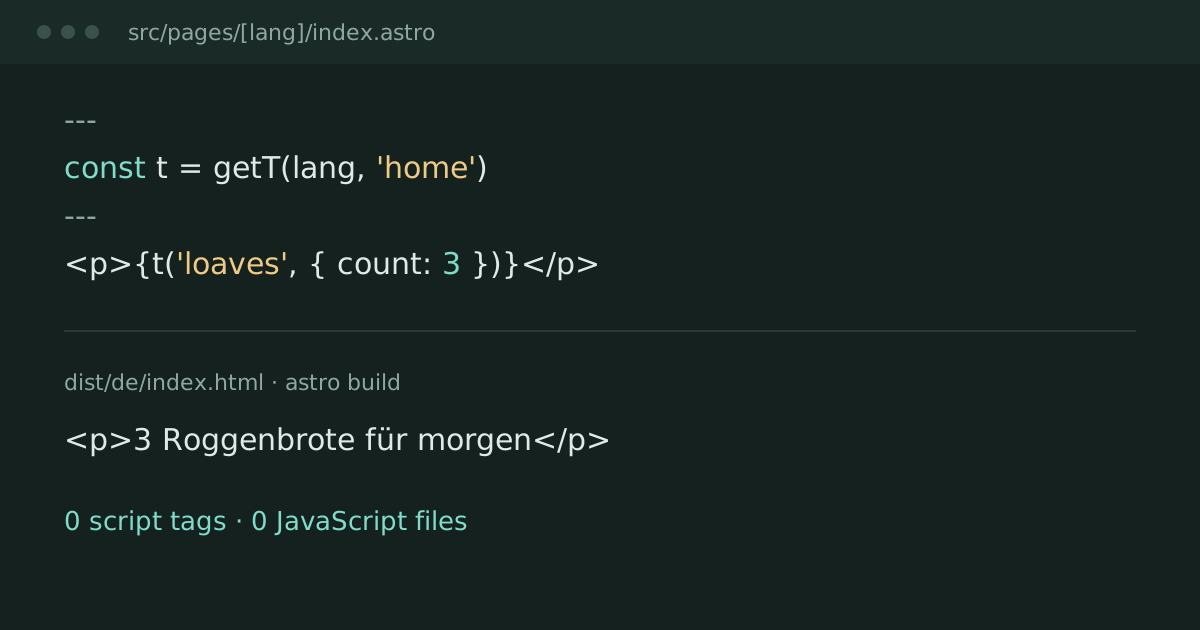
renders the pages. In a static build it runs only then: in our test of (Astro 7.4.13, i18next 27.2.2) the
build wrote one HTML file per language and page, with no JavaScript file and no script tag.
This guide first appeared on ; on it moved here, with i18next-cli and its Astro
plugin for the checks. Every step with its complete code is on the Astro page of the docs.
What you get
- one address per language, from Astro's routing;
t()from i18next in every.astropage: interpolation, plurals by the rules of each language, fallbacks, namespaces as files;- plain HTML per language, with
hreflanglinks between the language versions; i18next-cli extractwrites new keys into the files of every language, andi18next-cli statusstops the build when a translation is missing.
The setup
Install i18next, and for the checks i18next-cli with its Astro plugin. No integration package is needed:
npm install i18next
npm install --save-dev i18next-cli i18next-cli-plugin-astro
Give each language its address in astro.config.mjs:
import { defineConfig } from 'astro/config'

export default defineConfig({
  site: 'https://example.com',
  i18n: { defaultLocale: 'en', locales: ['en', 'de'], routing: { prefixDefaultLocale: true } }
})
One module, src/i18n/index.ts, loads every file in src/i18n/locales/<language>/<namespace>.json with
import.meta.glob, initializes one i18next instance for the build and exports getT(lang, ns), a t() bound to one
language (the docs show it in full). A page under src/pages/[lang]/ is then built once per language:
---
import Layout from '../../layouts/Layout.astro'
import { getT, languages, type Lang } from '../../i18n'

export function getStaticPaths () {
  return Object.keys(languages).map(lang => ({ params: { lang } }))
}

const lang = Astro.params.lang as Lang
const t = getT(lang, 'home')
---
<Layout lang={lang} title={t('title')}>
  <h1>{t('title')}</h1>
  <p>{t('loaves', { count: 3 })}</p>
</Layout>
With "loaves_one": "Ein Roggenbrot für morgen" and "loaves_other": "{{count}} Roggenbrote für morgen" in the
German file, /de/ says "3 Roggenbrote für morgen", and no script goes with it.
Astro's routing does not write hreflang links: the layout does, next to a language switch that swaps the first part
of the address (in the docs).
Keep every language complete
i18next-cli reads JavaScript and TypeScript files; with
i18next-cli-plugin-astro it reads .astro files too:
// i18next.config.ts
import { defineConfig } from 'i18next-cli'
import astro from 'i18next-cli-plugin-astro'

export default defineConfig({
  locales: ['en', 'de'],
  extract: {
    input: 'src/**/*.{astro,ts}',
    output: 'src/i18n/locales/{{language}}/{{namespace}}.json',
    defaultNS: 'common',
    // getT(lang, ns) takes the namespace second; next-i18next's getT, which the CLI knows, takes it first
    useTranslationNames: [{ name: 'getT', nsArg: 1, keyPrefixArg: 2 }]
  },
  plugins: [astro()]
})
extract adds new keys to the files of every language. status exits non-zero when a key has no translation in a
language, so with "build": "i18next-cli status && astro build" a missing text stops the build instead of reaching
the site.
What a static build leaves out
- A changed text needs a new build, like any other content of the site.
- Interactive parts run in an island (
client:load) with react-i18next or the binding of its framework, on the same JSON files. That island sends i18next to the browser: in a client-rendered React page, i18next 27.2.2 with react-i18next 18.0.3 adds 17.4 KB gzip once, and each text about 35 bytes per language (measured ).